Connecting apps
Vault is the authoritative source for secrets, but how do apps running on Kubernetes clusters retrieve these secrets, especially if the app needs to authenticate to Vault to retrieve the secret?
This "chicken-and-egg" problem is solved by the Vault Secrets Operator1 (VSO), a service that is configured when the cluster is created to help synchronize:
Kubernetes secrets Vault secrets.
Overview
Vault Secrets Operator is configured to authenticate with Vault so that it can act on behalf of apps to request secrets. VSO mediates authorization through Service Accounts, and then creates secrets that the app can consume.
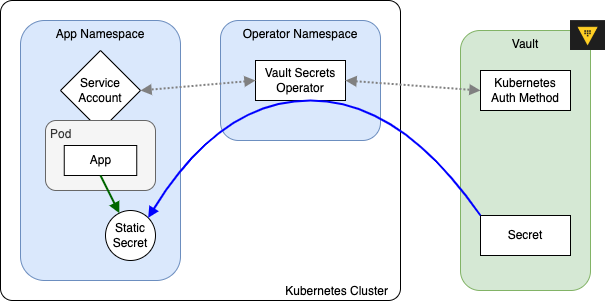
VSO in practice
From an app's perspective, the only thing that really matters is that it has access to the secrets it needs. This is usually accomplished through the Helm chart, which renders a Deployment resource with a projected volume secret.
Tip
Secrets are mounted into pods as files, not as environment variables
Configuring app secrets
Apps should read files at /etc/secrets/ (the default mountPath) based on the configuration in the Helm chart. A good way to verify that the secrets are being mounted correctly is to launch a terminal on a running container and browse around to see the file structure.
Configuring Helm charts
The Helm chart values.yaml has sections for secretMounts that generate corresponding Kubernetes resources with volumeMounts:
...
processor:
...
  # -- volumeMounts to be added as secrets
  # @default -- `[]`
  secretMounts:
    - name: api-key
      secretName: api-key
      mountPath: /etc/secrets
      readOnly: true
      items:
        - key: API_KEY
          path: api-key/API_KEY
...
apiVersion: apps/v1
kind: Deployment
...
spec:
  template:
    spec:
      containers:
        - volumeMounts:
            - name: processor-secrets
              mountPath: "/etc/secrets"
...
      volumes:
        - name: "processor-secrets"
          projected:
            sources:
              - secret:
                  name: "api-key"
                  items:
                    - key: "API_KEY"
                      path: "api-key/API_KEY"