Local development
Strategy
Rather than building one large monolithic application, we develop small, single-purpose apps and connect them together in a microservice architecture. This keeps services maintainable, testable, and easy to deploy independently.
Local development typically involves:
- writing and updating code
- building a development image
- running tests and local checks
- committing changes to a feature branch
Development loop
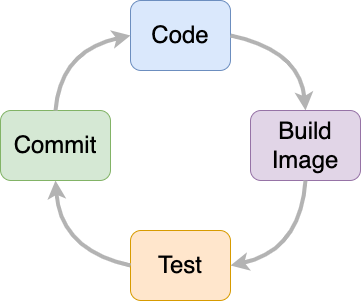
A container-based "dev loop"
- run local development environments using
docker compose - build development images
- run tests and other containerized commands
- scan images for vulnerabilities
Docker simplifies containerized app development by providing a consistent toolchain for building and running images across platforms. In most cases, getting started is straightforward: choose a suitable base image from Docker Hub2 and configure a Dockerfile that copies your code into the container.
The Dockerfile
The primary configuration file for building images is the Dockerfile. It defines a step-by-step set of instructions that the build engine follows to create everything an app needs to run. The final output is a reusable image that can typically run on any compatible host.
#-- Build --#
FROM node:24.6.0-alpine3.22 AS builder

WORKDIR /app

COPY package.json ./

RUN npm install

COPY . /app

RUN npm run build
...
For more information about best practices and available build options, refer to the Dockerfile reference documentation3.
docker-compose.yml
When you install Docker, you also gain access to the docker compose command, which can launch a complete local development environment. The docker-compose.yml file defines the services, networks, volumes, and environment variables needed for an app — or multiple apps — to run together.
In local development, a docker-compose.yml can configure:
- environment variables
- secrets
- mounted volumes
- networks
- supporting services (databases, caches, queues)
- a framework runtime (e.g., Python’s runserver or a Node.js dev server)
Tip
For a beginner-friendly introduction, see Docker Compose – What is It, Example & Tutorial4.
Example docker-compose.yml
Running a local development environment
Once your project includes both a Dockerfile and a docker-compose.yml, you can start a local dev environment with: